How staff opt in to FairRota texts
FairRota scheduling alerts are text messages about a person's own work schedule: open shifts they can pick up, call outs that need coverage, swap and time off decisions, and published schedules. No marketing. No patient information.
Opt-in steps
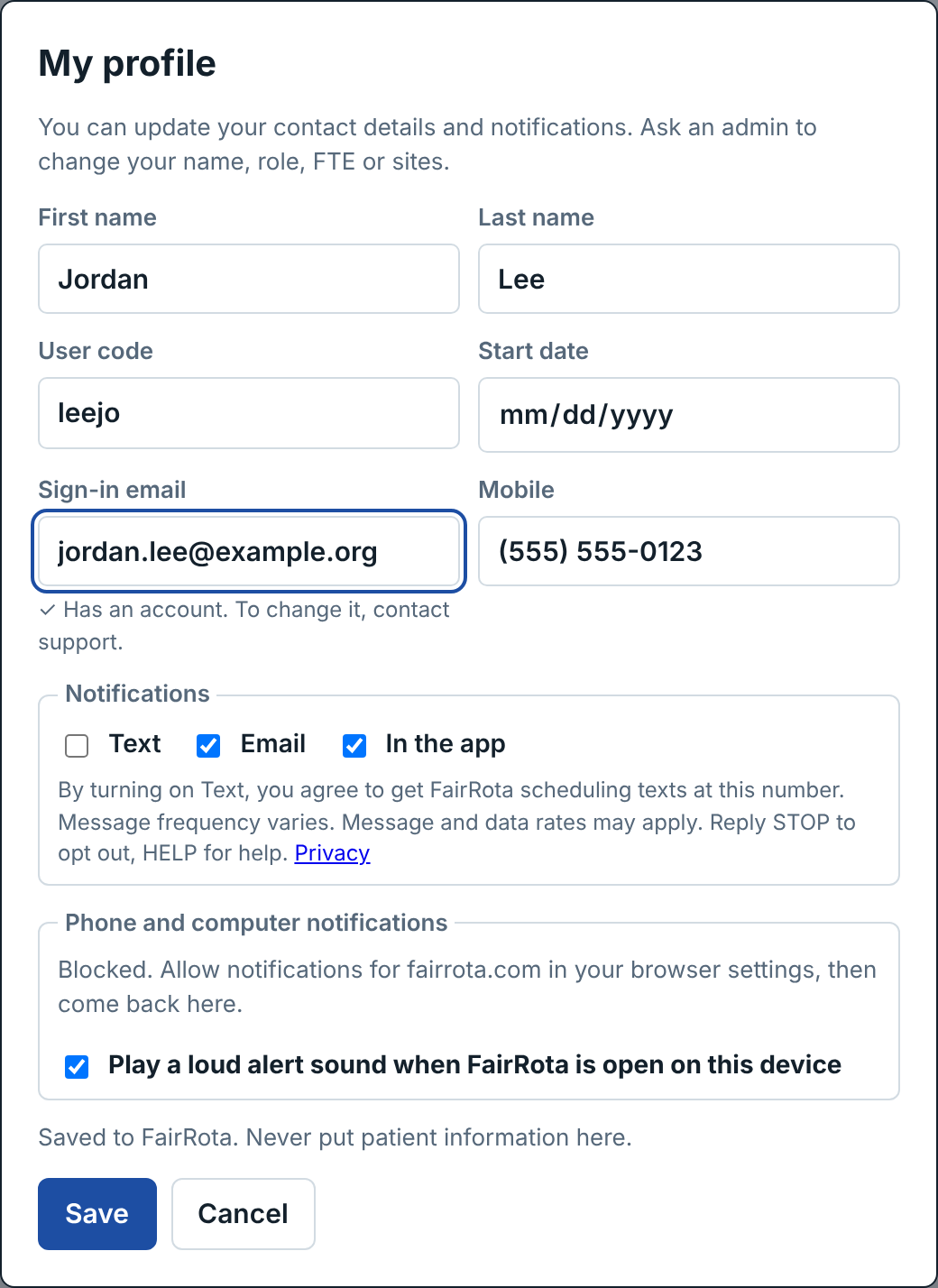
- The staff member signs in to FairRota with their own account.
- They open My profile and enter their mobile number.
- They tick Text. It is unticked by default, and an administrator cannot tick it for them.
- Right below the checkbox, before saving, the screen shows: "By turning on Text, you agree to get FairRota scheduling texts at this number. Message frequency varies. Message and data rates may apply. Reply STOP to opt out, HELP for help."
- They click Save. FairRota records the date and time of their consent.
Opting out and help
Reply STOP to any message to stop texts, or untick Text in My profile. Reply HELP for help, or email hello@fairrota.com. Message frequency varies. Message and data rates may apply.
Mobile numbers and text opt-in consent are not shared with third parties or affiliates for marketing or promotional purposes. See the Privacy Policy and Terms.